

Jump to content
View in the app

A better way to browse. Learn more.

FMForums.com

A full-screen app on your home screen with push notifications, badges and more.

To install this app on iOS and iPadOS
  1. Tap the Share icon in Safari
  2. Scroll the menu and tap Add to Home Screen.
  3. Tap Add in the top-right corner.
To install this app on Android
  1. Tap the 3-dot menu (⋮) in the top-right corner of the browser.
  2. Tap Add to Home screen or Install app.
  3. Confirm by tapping Install.

First things “first”

(0 reviews)

Back from DevCon and refocussing, as I think we all are. I’m trying the “desired outcomes” chart again (worked well when I worked it) and am reminded of Benjamin Franklin’s plan for each day:
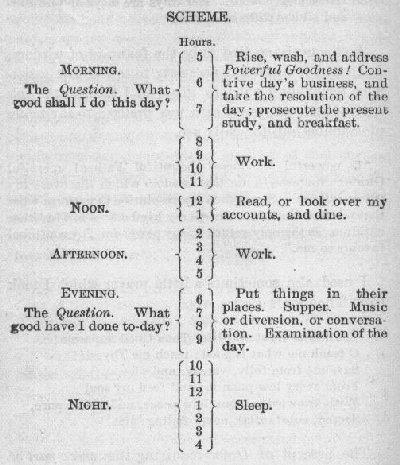
Wish I remembered where I snapped this.

Wish I remembered where I snapped this.

Pretty cool. The days when I do the most important thing before I start reacting to email are by far the most productive enjoyable. The “desired outcomes” chart is here.

The post First things “first” appeared first on SeedCode.


<a href="http://www.seedcode.com/first-things-first/" rel='nofollow external'>Source</a>

0 Comments

Recommended Comments

There are no comments to display.

Important Information

By using this site, you agree to our Terms of Use.

Configure browser push notifications

Chrome (Android)
  1. Tap the lock icon next to the address bar.
  2. Tap Permissions → Notifications.
  3. Adjust your preference.
Chrome (Desktop)
  1. Click the padlock icon in the address bar.
  2. Select Site settings.
  3. Find Notifications and adjust your preference.