




Sync Logs: Oh How I Love Thee

· 1,071 views
Ever since we added rich logging to GoZync, I’ve found the logs incredibly helpful. (Look for them to make their way into SeedCode’s next products as well.)
Here is a great example of why they’re so cool (and why having a transparent, scriptable sync helps developers)…
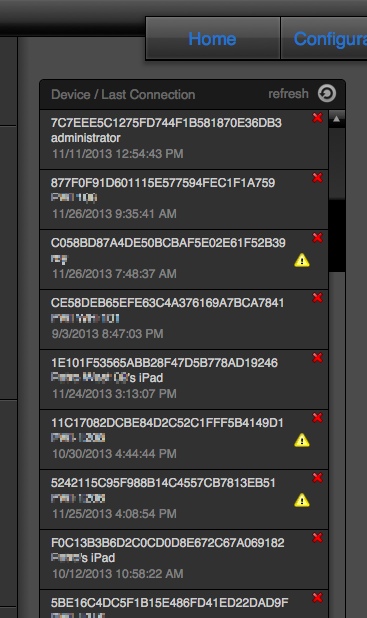
GoZync maintains the last sync log for each user.
A customer recently contacted us to say that their syncs were rolling back due to errors. This was new as they’d been up with GoZync for months.
The logs in their hosted file contain caution icons to quickly let me see that not all users are having sync issues, confirming my suspicion that THIS customer’s issue is around record validation. (Some user’s records were passing validation, some weren’t).
The log itself tells me that for my test sync, of 57 records being pulled, the sync had to stop on record number 48. =) So now I can investigate that one record and see what’s up. (This particular developer had GZ4.04 so we didn’t have the nice error trapping we added later. But ******* those logs are helpful.)
At this point I could suggest the customer put all their validation in the mobile file, so non-conforming record can’t even be created, or turn off validation during sync (a simple switch described at the end of the page here).
The customer can also easily import the scripts from the latest GoZync version and use the reported errors to hunt down which exact field is causing the validation issue.
Related: Debugging Using GoZync’s Logs
The post Sync Logs: Oh How I Love Thee appeared first on SeedCode.
Source
Recommended Comments