


Jump to content
View in the app

A better way to browse. Learn more.

FMForums.com

A full-screen app on your home screen with push notifications, badges and more.

To install this app on iOS and iPadOS
  1. Tap the Share icon in Safari
  2. Scroll the menu and tap Add to Home Screen.
  3. Tap Add in the top-right corner.
To install this app on Android
  1. Tap the 3-dot menu (⋮) in the top-right corner of the browser.
  2. Tap Add to Home screen or Install app.
  3. Confirm by tapping Install.

portal_with_0px_scrollbar.fmp12 1.0

1 Screenshot

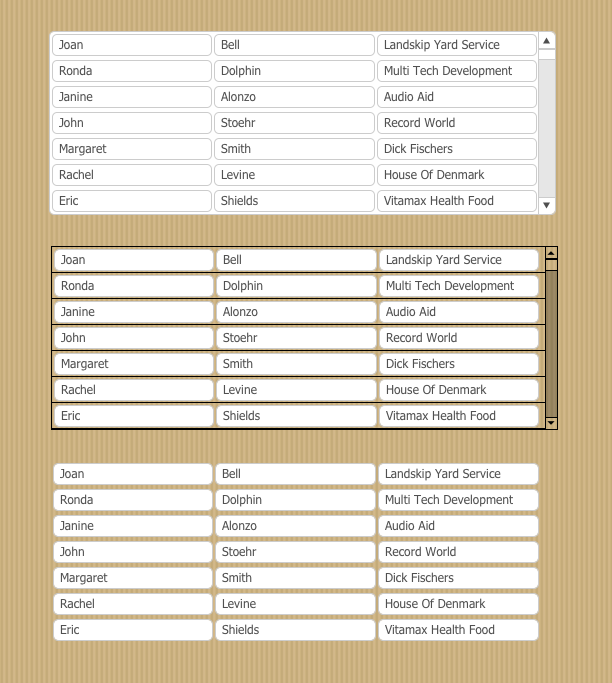
With this sample file you can copy the style from my portal with no scroll bars and then apply this appearance to the portals in your own solution.

In FM12 you can set the width of the portal scroll bar to be zero pixels wide, making it invisible but still scrollable. This is a great technique for making a clean iOS interface. (In FMGO12 the iOS temporarily displays it's own thin scroll bars as you are scrolling.)

TIP: FileMaker does not let you manipulate the scroll bar's appearance within FileMaker Pro but you can edit a theme's CSS file or you can use a program such as Clip Manager 4 to alter the how a portal looks.

Important Information

By using this site, you agree to our Terms of Use.

Configure browser push notifications

Chrome (Android)
  1. Tap the lock icon next to the address bar.
  2. Tap Permissions → Notifications.
  3. Adjust your preference.
Chrome (Desktop)
  1. Click the padlock icon in the address bar.
  2. Select Site settings.
  3. Find Notifications and adjust your preference.