Welcome to our community, full of great ideas on developing your FileMaker solutions effectively,
for peer-to-peer support of the FileMaker Platform and related products and services.
FileMaker Kanban is the latest tool that offers familiar functionality for users and flexibility for the developer. It offers great functionality and organizes your data visually into lanes and cards.
The post FileMaker Kanban: Organize Your Data appeared first on Geist Interactive.
View the full article
The FileMaker Script Debugger is powerful. Its features are often overlooked. In this post we examine the buttons that control stepping through a script.
The post Like a Boss: Using the Script Debugger to its Full Potential appeared first on Geist Interactive.
View the full article
Hacking Your Own FileMaker Platform Solutions
Should FileMaker Platform developers mount hacking attacks on their own solutions? At first glance, this may seem an odd question. But I believe that the answer is “Yes, we should.”
Consider this. As developers we see our solutions from a totally different perspective than Threat Agents see them. Without practicing our own hacking skills, we can become blind to the vulnerabilities a Threat Agent can exploit to compromise the Confidentiality
For the first time, DB Services has been ranked #3494 on the annual Inc. 5000 list, which ranks the country’s “fastest-growing innovators” based on overall revenue growth over a three-year period. The Inc. 5000 list has brought attention to America’s growing private businesses since 1982.
DB Services now joins the ranks of other Inc. 5000 list alumni such as Facebook, Zappos, Pandora, and others. DB Services is top ranked FileMaker Platinum Business Alliance Partner on the 2019 Inc. 5000 li
Hi all,
Today I'm happy to announce the release of Elemental for FileMaker. This is a free fully unlocked solution containing some cool user interface and design stuff that I hope you find useful and can incorporate into your own solutions.
You can grab a copy now at https://www.elemental-fm.com
In Elementals first version you'll find the following:
Avatars
Over 20 API integrations with avatar generators. These are uniquely generated based on a name y
Let me start by saying, this is the most complex technique in the series of five articles covering the restoration of found sets. The sequence started with an explanation of why it's important to save found sets, followed by simple solutions like creating new windows and collecting serial numbers. I even covered a variety of methods for collecting serial numbers to give readers different tools because every technique has it's time and place. The previous article took a different approach and use
Let me start by saying, this is the most complex technique in the series of five articles covering the restoration of found sets. The sequence started with an explanation of why it's important to save found sets, followed by simple solutions like creating new windows and collecting serial numbers. I even covered a variety of methods for collecting serial numbers to give readers different tools because every technique has it's time and place. The previous article took a different approach and use
Disclaimer: the technique shown in this article is provided on an as-is basis. Use with appropriate caution and at your own risk. Demo file: JSON-Array-Custom-Functions.zip (requires FM 18 or later) Have you ever noticed that FileMaker does not provide a JSON function to insert a new element into an existing array? For example, given this… Continue reading FM18: JSON.InsertArrayElement
View the full article
One of your most powerful methods of showing data, within a fully controlled manner, is using the combination of global fields and portals.
The portal object isn't simply for showing the related data as it belongs to one single record. A portal is a display tool useful for presenting whatever data you want and, however you want.
In this video, I use the example of showing multiple events based on the selection of multiple locations. Whether you need to provide a simple multi-selection option i
One of your most powerful methods of showing data, within a fully controlled manner, is using the combination of global fields and portals.
The portal object isn't simply for showing the related data as it belongs to one single record. A portal is a display tool useful for presenting whatever data you want and, however you want.
In this video, I use the example of showing multiple events based on the selection of multiple locations. Whether you need to provide a simple multi-selection option i
Because of the rich UI experiences which JavaScript provides within a web browser, it makes sense to take advantage of the various possibilities. The difficulty may be putting all the pieces together in order to get something working correctly.
Fortunately, JavaScript isn't just for those "other developers". Those who already know what they're doing. You too, can easily integrate and use JavaScript within your own solutions. You simply need to be ready to learn enough in order to integrate succ
Because of the rich UI experiences which JavaScript provides within a web browser, it makes sense to take advantage of the various possibilities. The difficulty may be putting all the pieces together in order to get something working correctly.
Fortunately, JavaScript isn't just for those "other developers". Those who already know what they're doing. You too, can easily integrate and use JavaScript within your own solutions. You simply need to be ready to learn enough in order to integrate succ
JavaScript, it may sound scary because learning any new technology, which includes so much more than FileMaker, feels like an overwhelming amount of new learning. The great thing is, learning just a few little pieces at a time is the best way to learn - little-by-little. So let's start with just a few little pieces.
In this video, I walk through the basics of how you get started with JavaScript within FileMaker Pro. How it's implemented and how to execute things. The great thing about getting
JavaScript, it may sound scary because learning any new technology, which includes so much more than FileMaker, feels like an overwhelming amount of new learning. The great thing is, learning just a few little pieces at a time is the best way to learn - little-by-little. So let's start with just a few little pieces.
In this video, I walk through the basics of how you get started with JavaScript within FileMaker Pro. How it's implemented and how to execute things. The great thing about getting
FileMaker Inc. Rebrands as Claris International
Looking Toward the Future, Software Company Revives Name From Past
FOR IMMEDIATE RELEASE: August 15, 2019
Names change. Google started out as Back Rub and Yahoo! was originally known as Jerry’s Guide to the World Wide Web. And FileMaker Inc.? That’s so old-fashioned. Last week, during FileMaker’s annual Developer Conference – AKA DevCon ’19 – the company announced it was going back to its roots, changing its name from FileMaker Inc. to Claris In
FileMaker Inc. Rebrands as Claris International
Looking Toward the Future, Software Company Revives Name From Past
FOR IMMEDIATE RELEASE: August 15, 2019
Names change. Google started out as Back Rub and Yahoo! was originally known as Jerry’s Guide to the World Wide Web. And FileMaker Inc.? That’s so old-fashioned. Last week, during FileMaker’s annual Developer Conference – AKA DevCon ’19 – the company announced it was going back to its roots, changing its name from FileMaker Inc. to Claris In
Disclaimer: the technique shown in this article is an attempt to work around an annoyance that can crop up when using FileMaker’s native JSONSetElement function. Use with appropriate caution and at your own risk. Acknowledgement: I owe a debt of gratitude to Paul Jansen for many illuminating JSON-related discussions over the last year or so.… Continue reading FM18: JSON.UpdateArrayElement
View the full article
At FileMaker DevCon 2019, I led over one hundred FileMaker developers in six hours of learning and working with JavaScript. It was a good day. We learned a lot. We made lots of mistakes. We fixed those mistakes. We felt pangs of frustration with the web viewer object. And we shouted with satisfaction when we […]
The post FileMaker & JavaScript: Extracting FM Web Viewer Bridge Code appeared first on Geist Interactive.
View the full article
Geist Interactive Team wins two FBA Excellence Awards at the FileMaker 2019 DevCon
The post Geist Interactive Wins Two Awards at The Last FileMaker DevCon appeared first on Geist Interactive.
View the full article
According to the FileMaker online help, the Snapshot Link feature saves a found set of records. But, it saves so much more including the current record, layout, sort order and the mode. The basic idea is to save a Snapshot Link and send it to a colleague via email so they can see what you are viewing. So much more efficient than trying to tell someone in another building or state how to recreate a found set. In this article, we're going to use Snapshot Links to save and restore multiple found se
According to the FileMaker online help, the Snapshot Link feature saves a found set of records. But, it saves so much more including the current record, layout, sort order and the mode. The basic idea is to save a Snapshot Link and send it to a colleague via email so they can see what you are viewing. So much more efficient than trying to tell someone in another building or state how to recreate a found set. In this article, we're going to use Snapshot Links to save and restore multiple found se
With Salesforce Marketing Cloud's SOAP API and automation tools, you can automatically import email engagement statistics into your FileMaker application and link them to customers and prospects. Learn how to integrate your FileMaker application with Salesforce Marketing Cloud to automatically import email campaign statistics.
Be sure to check out FileMaker Salesforce Marketing Cloud Integration
Includes free sample database and video.
dbservices.com
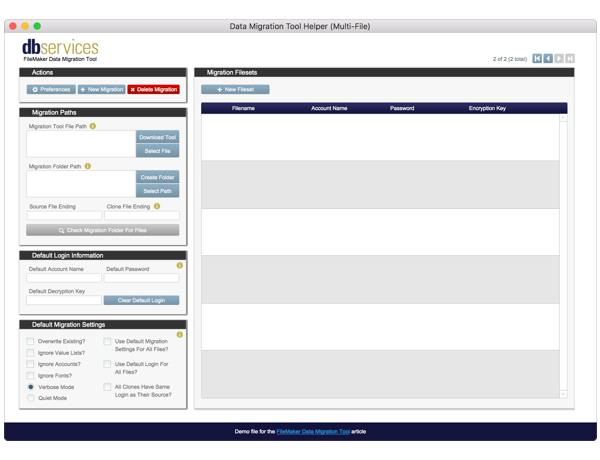
Learn more about the FM Data Migration Companion, a FileMaker file we built that automatically creates data migration CLI commands for both single-file and multi-file FileMaker applications.
Be sure to check out FM Data Migration Companion
Includes free download and video.
dbservices.com
Un petit mot en direct de la FileMaker DevCon, la conférence annuelle des développeurs FileMaker qui se tient cette année à Orlando, et à laquelle participent pour 1-more-thing Romain Dunand et votre serviteur. Brad Freitag, le nouveau CEO -qui avait occupé préalablement pendant six ans le poste de directeur des ventes— a fait quelques annonces […]
Cet article FileMaker Inc. devient Claris est apparu en premier sur 1-more-thing.
View the full article
Otto 2.1.5 includes an App Store. You can instantly install 3rd Party applications on your Otto powered FileMaker Server with a single click, making it super easy to demo interesting applications.
The post Otto App Store – Version 2.1.7 appeared first on Geist Interactive.
View the full article
Geist Interactive's DevCon 2019 Sale is back and better than ever. Get 20% off products in our store. If your order total is $3000 or more you'll get an additional 10% off. That adds up to 30% off. Implementation Packages are 10% off. The discount will be automatically applied when you check out.
The post DevCon Sale – 20% to 30% off on all Products appeared first on Geist Interactive.
View the full article
Solving real world problems within FileMaker can actually be quite fun. It's a certain type of challenge which includes making something fast, efficient and easy to maintain. It's the type of thing which keeps us developers and learners going.
Like most all software products, which allow for a high degree of creativity, it boils down to knowing the feature set and what's possible. When you learn the underpinnings, and you can really wrap your head around what the limitations or consequences are
Solving real world problems within FileMaker can actually be quite fun. It's a certain type of challenge which includes making something fast, efficient and easy to maintain. It's the type of thing which keeps us developers and learners going.
Like most all software products, which allow for a high degree of creativity, it boils down to knowing the feature set and what's possible. When you learn the underpinnings, and you can really wrap your head around what the limitations or consequences are