Welcome to our community, full of great ideas on developing your FileMaker solutions effectively,
for peer-to-peer support of the FileMaker Platform and related products and services.
Hi all,
Today I'm happy to announce the release of Elemental for FileMaker. This is a free fully unlocked solution containing some cool user interface and design stuff that I hope you find useful and can incorporate into your own solutions.
You can grab a copy now at https://www.elemental-fm.com
In Elementals first version you'll find the following:
Avatars
Over 20 API integrations with avatar generators. These are uniquely generated based on a name y
FileMaker Kanban is the latest tool that offers familiar functionality for users and flexibility for the developer. It offers great functionality and organizes your data visually into lanes and cards.
The post FileMaker Kanban: Organize Your Data appeared first on Geist Interactive.
View the full article
Hacking Your Own FileMaker Platform Solutions
Should FileMaker Platform developers mount hacking attacks on their own solutions? At first glance, this may seem an odd question. But I believe that the answer is “Yes, we should.”
Consider this. As developers we see our solutions from a totally different perspective than Threat Agents see them. Without practicing our own hacking skills, we can become blind to the vulnerabilities a Threat Agent can exploit to compromise the Confidentiality
Free webinar introducing Karbon our free application framework for building ambitious custom business applications. If you are interested in using the FileMaker Workplace Innovation Platform at a high level you'll probably want to see what we have cooked up.
The post Karbon Webinar – Getting Started appeared first on Geist Interactive.
View the full article
Part 2: What Should You Consider When Selecting a Development Partner? What Questions Might You Ask a Potential Developer?
Hiring a developer is about creating a working relationship. You want someone who gets your business and gets you. Having a good working relationship often determines the success or failure of a development project. Hire someone you are comfortable with who also has the skills necessary to make your project successful. Beyond the quality of the working relationsh
Slow FileMaker apps can frustrate users and limit growth. Discover proven optimization techniques for layouts, scripts, portals, calculations, and server environments to boost performance and reduce technical debt—ensuring your FileMaker solution scales smoothly with your organization’s needs! Includes video and demo file. dbservices.com
Today we’re going to look at an issue that can crop up in FileMaker JSON processing, and explore some approaches one might take to address that issue. Typically this issue arises with preexisting JSON coming from an API, including, but not limited to, the FM Data and OData APIs. Demo Files DAPI-destringify-JSON-500.zip DAPI-destringify-JSON-10K.zip Note: minimum… Continue reading JSON Object DestringificationView the full article
For many years, duplicating a record in FileMaker has been straightforward. You simply choose Duplicate Record from the Records menu and you’re done.
Things get more complicated when you also need to duplicate the associated related records. At that point, you typically have to “load” the related records, either with a Find or Go to Related Records script step, duplicate each one individually, and ensure the new primary key value is written into the foreign key field of every related record.
O
Searching in FileMaker has traditionally required users to understand field names, layouts, and how to build multi-step find requests. For smaller teams and non-technical users, that learning curve can slow things down and lead to frustration.
Natural language finds change that experience. Instead of constructing complex criteria, users can simply type what they are looking for in everyday language. FileMaker then uses AI to interpret the request, build the appropriate find criteria, and ret
The question is no longer if AI assisted coding will impact your work in FileMaker. The question is when you begin using it and how it shows up in your development process. That adoption may come from Claris through native features, from third party tools, or even from solutions you build yourself by using AI as part of your workflow to generate FileMaker code.
For those of us who have spent decades learning how to write code, this represents a significant shift. The value of manually composing
Let's evaluate better methods for generating and modifying large sample data sets (over 1 GB) in a FileMaker solution, when custom functions are ineffective for data greater than 10K characters. Improved methods included using FileMaker’s Get (UUID), or using JavaScript or Python, resulting in faster execution times and increased character limits, ultimately showcasing superior performance for larger data sets.View the full article
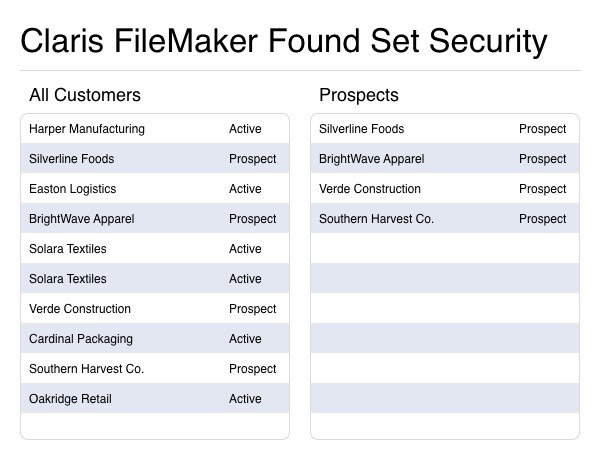
Struggling with clunky pop-ups and rigid record-level security in FileMaker? Found set security offers a more innovative way to control who sees what without disrupting the user experience. Discover how dynamically filtering records by role, access, or data can enhance the security, flexibility, and intuitiveness of your FileMaker apps. Includes a video and a sample file.
dbservices.com
Maintaining a comprehensive set of custom functions for managing windows in FileMaker can be extremely valuable. Once you’ve established a consistent set of standards, window behavior becomes predictable, and you no longer need to worry about repeatedly solving the same layout and positioning problems.
In this video, I showcase the collection of window-related custom functions I’ve developed and refined over the years. These functions are organized using the new custom function folders feature
Claris MCP is now available for the Claris FileMaker platform, introducing a standardized, zero-code way to connect AI assistants directly to your FileMaker data. This powerful integration enables real-time data access, analysis, and automation—making AI more accessible than ever within FileMaker solutions. Includes Video and Download File.
dbservices.com
Creating barcodes and QR codes in FileMaker is easier than ever. Using the free demo file from Productive Computing University, you will be able to use a single script step to generate both traditional barcodes and QR codes directly within FileMaker 2025. No fonts, no plug-ins, and no complex setup are required
If you’re managing inventory, printing labels, or sharing links, this approach makes it quick to generate professional barcodes and QR codes with minimal effort. The only requirement
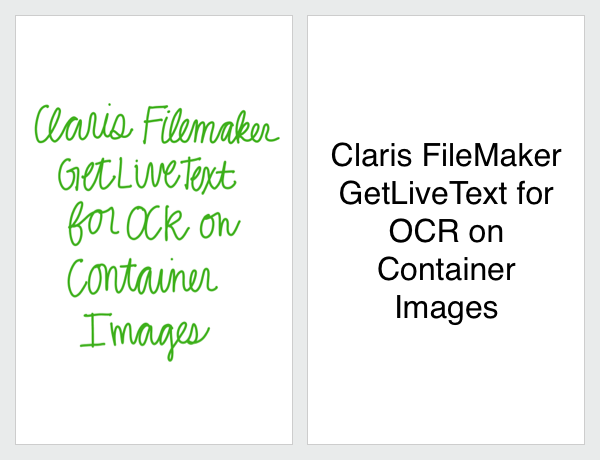
Optical Character Recognition (OCR) is transforming how businesses handle data in today’s digital workspace. Traditionally, extracting text from images required costly third-party integrations, but not anymore. With FileMaker’s GetLiveText feature, you can harness the built-in OCR capabilities of iOS and macOS to capture text directly within your database. This includes a video and a demo file.
dbservices.com
For many businesses, FileMaker has long served as the primary hub for data. However, there are plenty of situations where FileMaker either can’t perform a specific task or simply isn’t fast enough for the workload.
This is where external technologies shine. Python handles complex mathematical operations with exceptional speed. JavaScript can process large datasets far more efficiently than a FileMaker custom function. And your data doesn’t always need to live inside the same tool you use to man
If your team collects field notes, service updates, support comments, or quick entries from mobile devices, you know how inconsistent and unstructured text can be. Misspellings, shorthand, scattered thoughts, and long explanations can make important information hard to understand. With the AI capabilities available in FileMaker 2025, you now can clean up messy notes, generate clear summaries, and translate text into other languages directly inside your solution.
Our AI text manipulation tool
There’s a perfect irony in traveling thousands of miles to attend a conference about technology that can make travel obsolete. Video calls beam our faces across continents, AI assistants answer questions faster than any human, and collaboration tools that allow seamless handoffs.collaboration tools seamless handoffs. Yet Todd Geist and I boarded actual planes to sit […]
The post EngageU 2025, the view from Antwerp appeared first on Proof+Geist.
View the full article
Claris is getting into the Standby & Backup Feature Sets . . . This is part three in this series - here's the link if you've not reviewed the first blog post - FileMaker Prevention and Maintenance . We'll be entering 2026 with a raft of new features for the Claris Platform. The end of 2025 saw the release of the Claris MCP ( Model Context Protocol) in the context of allowing Developers and early adopters to review and test this feature set. At the time of publishing this blog, these two...Vi
Bare Metals Servers require UPS Battery Backup . . . This is part two in this series - here's the link if you've not reviewed the first blog post - FileMaker Prevention and Maintenance . This solution and code are from a recent two part project to protect the FileMaker Server Host protected by UPS VM synced to Synology NAS At the time of the project, I was unable to find any examples of the option to close the FileMaker files via the Admin API, hence I'm sharing the code here, for the...View the
Whether you're new to developing in FileMaker or have been using it for a while, unless you’re already familiar with standard timestamp formats and have experience working with external systems, there are several important things to understand about using dates, times, and timestamps within FileMaker — especially when integrating with other systems and APIs.
In this part of our series, we’ll explore a helpful suite of custom functions which serves as a solid foundation for nearly anything relat
The Outlook Manipulator plug-in makes it easy to connect your Claris FileMaker solution with Microsoft Outlook and the new Microsoft 365 Outlook (we refer to it as Outlook Remote). Whether you want to centralize contacts, archive emails, manage calendar events, or automate communication, Outlook Manipulator gives you the tools to make Outlook an integrated part of your FileMaker workflow.
Direct Integration with Outlook Remote and Outlook Classic
Outlook Manipulator supports both modern
In my opinion, before creating your first complex solution in FileMaker, it’s best to become familiar with the core features the environment provides. When considering how to structure your solutions — whether using a data separation model or a single file — it helps to understand how certain features can influence your decisions.
In this video, I cover the External Data Sources feature. While this feature is primarily intended for connecting to external data sources, its utility goes beyond si
See how FileMaker can use AI to perform live internet searches and return real-time company data, news, and insights. Explore how to connect FileMaker to OpenAI to gather and organize results directly within your solution.
AI models are powerful, but their training only extends to a specific date, which means they often lack awareness of recent news or developments. When you enable AI search, FileMaker can look up current information on the web and combine it with the model’s existing knowle
As with all increasingly complex human creations, especially those that go beyond the simple steps of “1, 2, 3, and done”, it’s important to plan for a solid foundation. A well-thought-out foundation guides a project toward long-term success and easier maintenance once the initial effort has been invested.
These early investments in your technical solution cover a variety of areas, one of the most important being permissions. Controlling what can be done, and by whom, not only protects against