Welcome to our community, full of great ideas on developing your FileMaker solutions effectively,
for peer-to-peer support of the FileMaker Platform and related products and services.
GoDraw3 is a FileMaker drawing tool for users. For FileMaker developers, however, it is full of customization. A developer can do with it what she wants.
The post GoDraw3: Hack the Heck Out of It appeared first on Geist Interactive.
View the full article
Free webinar introducing Karbon our free application framework for building ambitious custom business applications. If you are interested in using the FileMaker Workplace Innovation Platform at a high level you'll probably want to see what we have cooked up.
The post Karbon Webinar – Getting Started appeared first on Geist Interactive.
View the full article
Author’s note: Inevitable comparisons will be drawn between the new While function and the venerable CustomList custom function, which I wrote about at length several years ago. Preliminary testing indicates that CustomList is faster under certain circumstances and While is faster under others. In my opinion, both of them belong in your developer tool kit. […]
View the full article
Hi all,
Today I'm happy to announce the release of Elemental for FileMaker. This is a free fully unlocked solution containing some cool user interface and design stuff that I hope you find useful and can incorporate into your own solutions.
You can grab a copy now at https://www.elemental-fm.com
In Elementals first version you'll find the following:
Avatars
Over 20 API integrations with avatar generators. These are uniquely generated based on a name y
The FileMaker Script Debugger is powerful. Its features are often overlooked. In this post we examine the buttons that control stepping through a script.
The post Like a Boss: Using the Script Debugger to its Full Potential appeared first on Geist Interactive.
View the full article
Who doesn't want to know how long something takes? It's not like we, as the busy bees we are, have all the time in the world - right? Well, how about some convenient progress information.
One of the most common procedures within all of computing is to cycle or iterate over a set of something. In FileMaker, this comes in the form of records. A record loop is one of the most common things you'll ever do within FileMaker.
Setting a field value to something else across a range of records? You'll l
Double data entry is often the enemy of companies that use both FileMaker and Sage Intacct. In this article, we will demonstrate how you can eliminate the hassle of manually copying the information by integrating your FileMaker solution with Sage Intacct. Includes video and sample file. Read the full article here.
FileMaker Pro provides a variety of methods for extracting your data from its database. From memory, we have standard relationships and calculated concatenations, the Copy All Records script step, scripted data loops and using the ExecuteSQL function. In FileMaker 19, we're provided with yet one more method for pulling data out of the system. The Execute FileMaker Data API script step allows us to use what was formerly available only from outside of FileMaker Pro via a url.
Now, within our scri
The Claris FileMaker Add-ons, released just a few updates ago, are one of the components that make up the Open Platform release. They’re useful in solving problems for FileMaker developers. Calendars and Kanban boards are popping up all over the community. They’re not without their issues, however, but most of what’s there we can control. […]
The post FileMaker add-on Found Set: Changing the Limit and Offset appeared first on Geist Interactive.
View the full article
A lot has happened in 2020 but I'm not hear to preach about the pandemic, the presidential race or George Floyd. A ton has transpired in the FileMaker market too! Probably the biggest news is JavaScript and FileMaker living in perfect harmony. But, I'll also pontificate about quarterly releases, Claris Engage, public speaking and even publishing in the FileMaker market. All of these subjects have come to exist or have changed drastically in the 2020 FileMaker market. So... sit back and enjoy th
There's a great feeling about writing functional code when it's something you can rely on. You know it's just going to work. Which, for some import routines, doesn't always feel this way. Sometimes the import may fail or you can't figure out how to make it work.
Columns may get renamed, they may be shifted around and vary or you may be importing from multiple different providers. If you're consolidating data from multiple sources or you have a situation where you need to manipulate the data bef
In normal years, when I get to travel around and speak to people about FileMaker, I am always gratified by how many of you in our FileMaker community ask me about One Spark Academy, the non profit learning center that my wife Lori and I started in 2011. Many of you follow the happenings there, […]
The post One Spark Academy 2020-2021 Giving Campaign appeared first on Geist Interactive.
View the full article
Demo file: set-variable-by-name-v2.zip (requires FM 16 or later) INTRODUCTION You’ve probably heard the old joke that goes… Patient: Doc, it hurts when I do this. Doctor: Don’t do that. Perhaps you’re also familiar with the FileMaker equivalent? Developer: It hurts when I try to assign certain variable names. FileMaker: Don’t do that. Or how about… Continue reading Set Variable By Name Revisited View the full article
Every trade has its own tips for making your work go faster or happen more easily. During this holiday season I thought it would be great to bring you 12 Tips of Developing in FileMaker Pro.
So, I opened FileMaker and stared at the blank screen of a new file thinking about the things that tend to help me out the most. I pulled down a CSV file from Data.gov and just let the tips flow out from there.
I hope, with this list of 12 tips, you'll pick up some productivity enhancements that will carry
With a handful of simple scripts and just a few fields, you can easily accomplish some powerful image organization both inside and outside of FileMaker. In this video, we take a look at how FileMaker can be used to organize a collection of images. This is prior to sending them out or making them available for a web server to host them.
If your FileMaker solution needs to work with images used for verification or any form of media communication, then learning how you can make FileMaker bend to y
Claris' 19.2 release of the FileMaker platform is out! In this article we will discuss our favorite new features including upgrading Server 16+ straight to 19.2, Pro’s Big Sur compatibility updates, and a preview of creating apps directly in a browser! Read the full article here.
Using JSON for passing multiple parameters can be a real life saver. Because JSON keeps all individual parameters separate from each other, you can pass pretty much any type of data except for container data - although you can pass a reference to a container easily enough. Your parameters can also have as many levels as necessary and the JSON can easily be modified as it moves from script to script.
When writing a complex and large collection of scripts, you eventually hit errors and issues. Yo
The SVG button icons that come included with FileMaker are great but there are so many holes in the library. Lately, I've been scouring the internet for free icons to meet the needs of some more complicated client interfaces. When I find a good one, it usually isn't in SVG format so I have to convert it and then add the FileMaker fill tag to get the icon ready for prime time. What I'm going to do in this article is take you through my journey to learn more about finding, manipulating and impleme
FileMaker natively provides us with some really nice tools for user feedback. We can use the Show Custom Dialog or even create a dedicated dialog using a Card Window and Layout.
There are, however, times when you need something a little more subtle. Just a simple message on screen will often suffice. The next question is whether you need the user to interact with that message or not. The solution is simply to provide both options of course.
In this video and technique file, we explore a super
It's been almost 18 months since the release of elemental_ux , and we haven't been resting....
elemental_log is our take on audit logging. Built to be super fast to log changes and even faster to integrate into your own solutions. In just a few minutes you can add a full JSON based audit trail to your solution that can track changes to whatever fields you want. We've also included an intuitive configuration tool for choosing what to log - no hard coding required.
Other Features
Demo file: a-value-list-experiment.zip Note 1: today’s demo is recycled from the one that accompanied Virtual Portal, part 2. All we care about today is how we assign the parent company; the remainder can be ignored. Note 2: if you’re unclear on value list basics, check out Thinking About Value Lists, part 1. “I want it… Continue reading A Value List Experiment View the full article
The wonderful thing about creating software is it feels like you're able to create your own universe. You're the master of that universe and how it functions and reacts to its users. It's a very empowering feeling to know you can direct and control data in a way that makes it useful to others.
When considering all the directions that software can take there's always that simple fact that different people like different things. Heck, someone buys the Rhubarb from the grocery store - because they
With our new free FileMaker add-on, FM Draw, you'll be able to write on images in FileMaker in just a few simple steps. Whether you're looking to make notations to a design or highlight sections of an image, we have you covered! Read the full article and download the add-on here. https://dbservices.com/blog/fm-draw
dbservices.com
Portals are wonderful tools for showing related data relevant to what your solution is solving. Sometimes, however, there's a trick to getting them to show exactly what you want. The combination of functions required may not always be obvious and it can be hard to achieve the desired result.
Essentially, you have to know how to extract the specific key values which allow you to filter only the desired rows. In this video, I walk through all the specifics of creating a custom function which allo
There's this special feeling you get when developing software where you feel like you've created something magical. Sometimes, it doesn't even matter if you've done the same type of thing before. It just feels like you're the master of the universe and you've created something super useful.
This may even be the case when you're simply creating a virtual trash can and providing users with the ability to reverse course on that accidental record deletion.
In this video, we're taking a look at a s
It’s been a few weeks since the Claris FileMaker add-ons were put into the product. A lot has happened since then. People have explored them using the sample data and even their own. The community is now filled with questions about these new packages of functionality. People are discovering what can be done with them. […]
The post In-Product Add-ons: A Few More Things appeared first on Geist Interactive.
View the full article
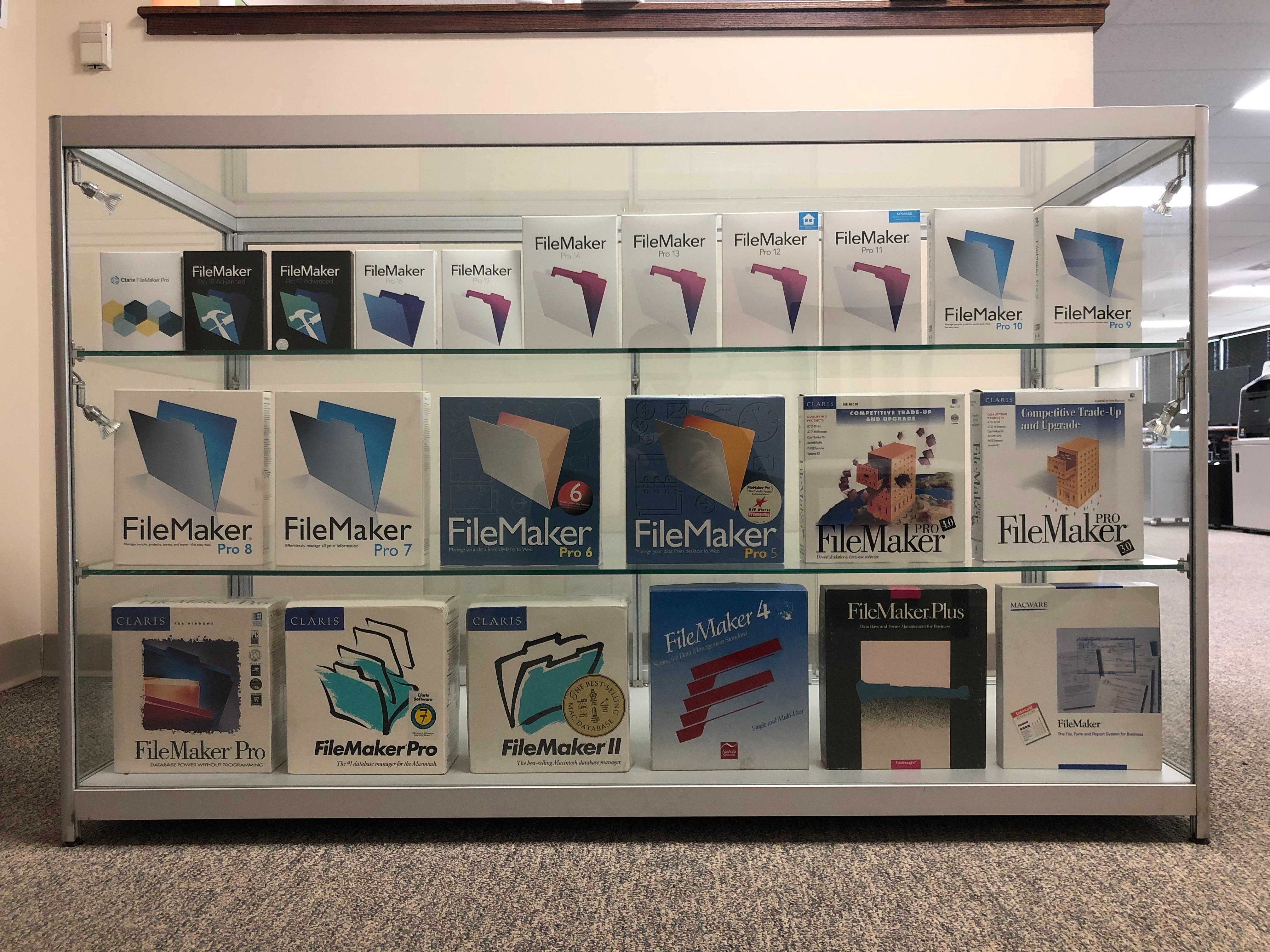
Our display case represents years of growth for Claris, FileMaker, and us here at DB Services. Check the bottom shelf for our most recent addition, the rare FileMaker 4 box from 1988!
dbservices.com
Do you need to work with online APIs and find yourself wishing there was an easy way to accomplish it? Well, there actually is. In fact, in much of technology, there's something or someone somewhere which has likely already solved the problem.
In the case of using REST (Representational state transfer) to interact with service APIs within FileMaker, it's nice to have a single tool which will handle most of the heavy work for you. When native JSON was added to FileMaker, the last piece to the pu