Welcome to our community, full of great ideas on developing your FileMaker solutions effectively,
for peer-to-peer support of the FileMaker Platform and related products and services.
FileMaker offers many different options for charting, but if you need a chart that is not available in FileMaker, you should consider using Google Charts. Google Charts is a free Javascript framework that can be used in conjunction with web viewers in FileMaker to extend your charting capabilities: https://dbservices.com/articles/google-charts-in-filemaker/
dbservices.com
Hacking Your Own FileMaker Platform Solutions
Should FileMaker Platform developers mount hacking attacks on their own solutions? At first glance, this may seem an odd question. But I believe that the answer is “Yes, we should.”
Consider this. As developers we see our solutions from a totally different perspective than Threat Agents see them. Without practicing our own hacking skills, we can become blind to the vulnerabilities a Threat Agent can exploit to compromise the Confidentiality
The FileMaker Let function is your tool to make a calculation readable, well formatted and easy to debug. Let us discuss how it can be used.
The post Like a Boss: Let us Discuss the FileMaker Let Function appeared first on Geist Interactive.
View the full article
Part 2: What Should You Consider When Selecting a Development Partner? What Questions Might You Ask a Potential Developer?
Hiring a developer is about creating a working relationship. You want someone who gets your business and gets you. Having a good working relationship often determines the success or failure of a development project. Hire someone you are comfortable with who also has the skills necessary to make your project successful. Beyond the quality of the working relationsh
FileMaker Kanban is the latest tool that offers familiar functionality for users and flexibility for the developer. It offers great functionality and organizes your data visually into lanes and cards.
The post FileMaker Kanban: Organize Your Data appeared first on Geist Interactive.
View the full article
When you know just a little part of how FileMaker works under the hood, you can come up with creative solutions to everyday problems. Take web services as an example. They use defined structures such as XML and JSON. And, when you consider that you’re using this third party defined structure and the need to mix in your own data, you want to find the easy way to solve the problem.
In my case, I really like the path of least resistance. Of course, there are many ways to solve a problem. Let’s con
When you know just a little part of how FileMaker works under the hood, you can come up with creative solutions to everyday problems. Take web services as an example. They use defined structures such as XML and JSON. And, when you consider that you’re using this third party defined structure and the need to mix in your own data, you want to find the easy way to solve the problem.
In my case, I really like the path of least resistance. Of course, there are many ways to solve a problem. Let’s con
As you’re probably aware, whenever a great craftsman has a project in front of themselves, they’re likely picking from not just one tool but many. What this means, in the context of FileMaker, is that you can’t just stop with using FileMaker alone. There are many times when it makes more sense, or will net bigger benefits, when you go outside of FileMaker.
The trick is this, you don’t necessarily need to go too far outside of FileMaker to accomplish some amazing things. Right within FileMaker i
As you’re probably aware, whenever a great craftsman has a project in front of themselves, they’re likely picking from not just one tool but many. What this means, in the context of FileMaker, is that you can’t just stop with using FileMaker alone. There are many times when it makes more sense, or will net bigger benefits, when you go outside of FileMaker.
The trick is this, you don’t necessarily need to go too far outside of FileMaker to accomplish some amazing things. Right within FileMaker i
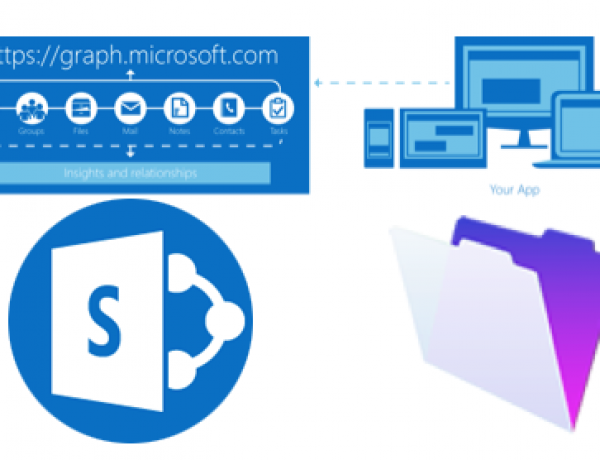
Do you have documents that need to be shared on multiple platforms? Learn how to integrate FileMaker with SharePoint via Microsoft Graph API. Includes a free sample file and demo: https://www.dbservices.com/articles/integrating-filemaker-and-sharepoint-using-microsoft-graph/
www.dbservices.com
In the world of software development, you’re basically taking things apart. Adding data here, taking away data there and remixing things. Simply put, it’s all just a matter of how the data needs to be presented to those who wish to see it.
In the first video in this series, we did the data collection and now we need to do something with that data. In most cases, you’re typically going to be parsing data if it’s not in a format ready to be stored. So, we need to parse the custom functions and th
In the world of software development, you’re basically taking things apart. Adding data here, taking away data there and remixing things. Simply put, it’s all just a matter of how the data needs to be presented to those who wish to see it.
In the first video in this series, we did the data collection and now we need to do something with that data. In most cases, you’re typically going to be parsing data if it’s not in a format ready to be stored. So, we need to parse the custom functions and th
Developing software is simply a matter of solving a problem by organizing and collecting data in a manner which makes the data useful to the end user. So, we’re just a bunch of data organizers and presenters.
One of the biggest benefits to a software developer is their known resources. There are tons of resources available to us every day. Sometimes, it’s a matter of knowing where those resources are and others it’s a matter of taking advantage of what we already have.
In this video, I start a
Developing software is simply a matter of solving a problem by organizing and collecting data in a manner which makes the data useful to the end user. So, we’re just a bunch of data organizers and presenters.
One of the biggest benefits to a software developer is their known resources. There are tons of resources available to us every day. Sometimes, it’s a matter of knowing where those resources are and others it’s a matter of taking advantage of what we already have.
In this video, I start a
Security Vulnerabilities of FileMaker Platform API’s: An Update
January 9th 2017
In an April 2016 entry on this BLOG titled The FileMaker Platform API’s Are Your Friends, Right? [http://fmforums.com/blogs/entry/1535-the-filemaker-platform-api’s-are-your-friends-right/] I discussed a number of FileMaker Platform security issues centered on the uncontrolled use of a number of external Application Program Interfaces (API’s). There are at least nine of these API, possibly more, if E
Click the video to watch.
Click here for more details about the Focus on FileMaker Development Course
Click the title or link to this article to view the video.
View the full article
Click the video to watch.
Click here for more details about the Focus on FileMaker Development Course
Click the title or link to this article to view the video.
View the full article
Each time a new version of FileMaker is released there are more features and more information about what’s possible with the software. More functionality means more learning in order to take advantage of those features.
There are, however, core features which should be known by all developers. This includes knowing how to script Find mode and building an interface around the search functionality. Knowing how to script an omitted find request may not be super obvious unless you think of Find mod
Each time a new version of FileMaker is released there are more features and more information about what’s possible with the software. More functionality means more learning in order to take advantage of those features.
There are, however, core features which should be known by all developers. This includes knowing how to script Find mode and building an interface around the search functionality. Knowing how to script an omitted find request may not be super obvious unless you think of Find mod
Editor’s note: Today I’m pleased to present a guest article and accompanying demo file written by Joel Englander on using ExecuteSQL + a global multi-line key as an alternative to FileMaker’s built-in portal filtering mechanism, with dynamic portal sorting included as an added bonus. Demo file: fm-sqlportal-filter-and-dynsort.zip (75 Mb compressed, 230 Mb uncompressed) Portal Filtering […]
View the full article
It’s so easy with FileMaker, to simply add, add and add some more - especially to the Relationship Graph. You get the request to see a different set of data, and you hop right to it by adding a new relationship and table occurrence.
Wait a second! Each time you add something new to your FileMaker solution you’re making an agreement with yourself that you’re willing to maintain an ever growing garden of technological spaghetti. With a bit of planning and know-how, you can easily satisfy a growin