Welcome to our community, full of great ideas on developing your FileMaker solutions effectively,
for peer-to-peer support of the FileMaker Platform and related products and services.
The FileMaker Let function is your tool to make a calculation readable, well formatted and easy to debug. Let us discuss how it can be used.
The post Like a Boss: Let us Discuss the FileMaker Let Function appeared first on Geist Interactive.
View the full article
FileMaker Kanban is the latest tool that offers familiar functionality for users and flexibility for the developer. It offers great functionality and organizes your data visually into lanes and cards.
The post FileMaker Kanban: Organize Your Data appeared first on Geist Interactive.
View the full article
[ Edit: 3/16/2016 - With the help of some other people, we have been able to recover, or recreate some of the original images from original thread. ]
Security is always a big topic when it involves data, or people, or possessions. Recently, over on the FileMaker Community, there was a very beneficial discussion regarding security. Unfortunately, that discussion was the victim of a necessary action...and was deleted. It was deleted, because the discussion was tied to a video that, as was det
Forums are a great way to get technical advice for FileMaker but for some reason, many people don't think they have to be nice in the electronic world. I was raised to say "please" and "thank you" and that has translated over to the internet for me. But, other folks think the anonymity of cyberspace is an excuse to be a jerk. Some posters are outright offensive and others will just leave snide responses like, "that wasn't much help". News flash! People on the internet are real and you should be
Free webinar introducing Karbon our free application framework for building ambitious custom business applications. If you are interested in using the FileMaker Workplace Innovation Platform at a high level you'll probably want to see what we have cooked up.
The post Karbon Webinar – Getting Started appeared first on Geist Interactive.
View the full article
The great thing about FileMaker Pro is it has it’s companion app FileMaker Go. Without FileMaker Go having arrived when the mobile revolution started taking off, FileMaker might have had a hard time staying viable.
Because of FileMaker Go, we can build solutions for armies of mobile users heading out in the field. Even better, we can make easy little applications for ourselves which do cool things.
While the limitations within FileMaker are actually quite small, there will always be some burni
TLDR Overview
L5SimpleFM is a PHP package used to provide a simple, readable, declarative syntax for accessing data hosted on a FileMaker Server from a composer-friendly PHP project. The package also has a ServiceProvider class which allows it to be easily pulled into a Laravel 5 project.
Read more ›
The post L5SimpleFM v 1.0 – A Composer and Laravel 5 friendly PHP package for interacting with hosted FileMaker data appeared first on FileMaker Development Company.
View the full article
Join us Tuesday, September 22, for a free one-hour webinar at 2pm (EST)/ 1pm (CST)/ 11am (PST), as Mark Richman presents Options for Licensing FileMaker Platform. During the webinar, he will explain the different options for connecting users to FileMaker solutions, and demystifies the various options for licensing the technology.
Read more ›
The post Join Us for FM Academy Webinar: Options for Licensing FileMaker Platform appeared first on FileMaker Development Company.
View the full articl
Ready to Play Hide and Seek with a Button in a FileMaker Pro Portal Row?
By Rob Poelking
I just figured this out and thought it was cool enough to share with you. It’s pretty commonplace to put a button over a FileMaker Pro portal row object to trigger an event related to that particular row. But sometimes you don’t want a button across the entire row. So then we typically put a visual button off to the side like an “edit” button, but the result can be unsightly seeing “edit” repeated a dozen
Attachment
Size
CleaningInputData.zip
273.33 KB
By Matt Petrowsky
Download Video
Users make mistakes. There’s no doubt about that. When given the opportunity, they’ll enter characters and text strings you never expected.
The easy solution to this problem is to simply control the result of what they’ve input. When capturing the input, there may be a variety of rules regarding how you want the data stored.
Do you want to store “4 pm” or 16:00:00? Is the user entering suffixes suc
Download Video
Users make mistakes. There’s no doubt about that. When given the opportunity, they’ll enter characters and text strings you never expected.
The easy solution to this problem is to simply control the result of what they’ve input. When capturing the input, there may be a variety of rules regarding how you want the data stored.
Do you want to store “4 pm” or 16:00:00? Is the user entering suffixes such as Jr. or Sr. into the last name field or the first name field? Should the inpu
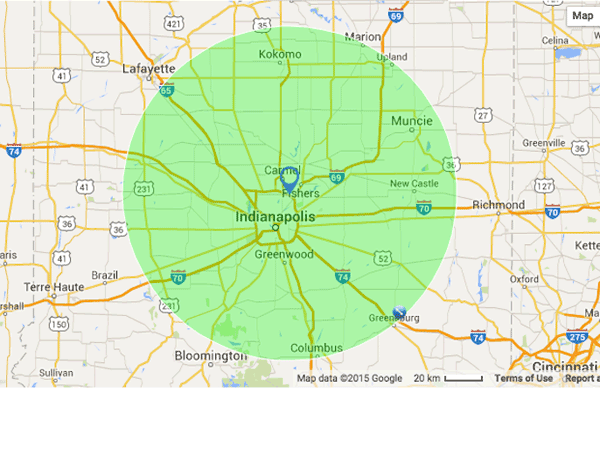
Learn how to perform a radius search within your FileMaker solution by using Google Maps API! Includes a free sample file and tutorial video: https://www.dbservices.com/articles/filemaker-radius-search/
dbservices.com
I ran into a situation recently where a user would not or could not remember to commit their changes before exiting their FileMaker Go solution on their iPad.
In this case, the user was using an iPhone or iPad Mini. He pulls it from his pocket, opens a work order, adds some photos and notes, and then sticks the device back in his pocket. Then he does some work (like replacing a window in a building) and then takes some more photos of the completed repair.
Read more ›
The post Help iOS us
No Access? Watch the preview video here. ManipulatingCSVExports_Pre.mp4
Attachment
Size
ManipulatingCSVExports.zip
280.29 KB
By Matt Petrowsky
Exchanging data between systems has always been a matter of format. The output systems needs to output in the expected input format for the inbound system - and it works the same way when going in reverse.
When it comes to data interchange formats, some of the most prevalent are arguably CSV (comma separated value) and Tab delimited.
Exchanging data between systems has always been a matter of format. The output systems needs to output in the expected input format for the inbound system - and it works the same way when going in reverse.
When it comes to data interchange formats, some of the most prevalent are arguably CSV (comma separated value) and Tab delimited.
The problem with these formats however, is that one person’s CSV is not necessarily another’s. The CSV “standard” actually has no standard. There is an RFC (Reque
No Access? Watch the preview video here. UltraEasyVcalendar_Pre.mp4
Attachment
Size
UltraEasyVcalendarExporting.zip
275.55 KB
By Matt Petrowsky
When it comes to accomplishing things within FileMaker Pro, some of the most sublime techniques are also the most empowering.
This particular technique, while focused on exporting calendar events, showcases some of my most favorite power-user methods for manipulating data. In my personal scenario, I was provided with a standard sprea
When it comes to accomplishing things within FileMaker Pro, some of the most sublime techniques are also the most empowering.
This particular technique, while focused on exporting calendar events, showcases some of my most favorite power-user methods for manipulating data. In my personal scenario, I was provided with a standard spreadsheet formatted to show a calendar of events broken down month-by-month.
The spreadsheet was formatted to be easily used and viewed by humans. It was not, however
Editor’s note: Today it’s my honor and privilege to present an article by guest author Beverly Voth, whose contributions to the FileMaker community are numerous and much appreciated. It’s great to have her back here on FileMaker Hacks. FileMaker 13 & 14 have some features that can be leveraged to allow one layout to toggle between […]
View the full article
Skeleton Key will be taking our 3-day Developer Essentials, FileMaker Training class to the Nashville, Tennessee area from Tuesday September 22 to Thursday, September 24.
The course will be hosted at:
Goodall Homes, 323 Maple Street, Suite 100, Gallatin, TN 37066
Seating is limited. Register ASAP, if you are interested in attending this training class.
Read more ›
The post FileMaker Training: Developer Essentials Class in Nashville, TN Area appeared first on FileMaker Development Company.
Attachment
Size
ButtonBarFeedback.zip
278 KB
Download Video
FileMaker 14 introduced a new layout object called a Button Bar. It’s essentially a wrapper around multiple buttons which can be used as either a conventional button or a popover menu.
The great thing about button bars is they respect a hierarchy. If you hide the whole Button Bar, then nothing shows. If you hide just one segment, which is what one individual button within the bar is called, then the bar will retain its size
Download Video
FileMaker 14 introduced a new layout object called a Button Bar. It’s essentially a wrapper around multiple buttons which can be used as either a conventional button or a popover menu.
The great thing about button bars is they respect a hierarchy. If you hide the whole Button Bar, then nothing shows. If you hide just one segment, which is what one individual button within the bar is called, then the bar will retain its size and simply not show the given segment.
All button segm
No Access? Watch the preview video here. QRCodes_Pre.mp4
Attachment
Size
QRLoginSystem.zip
311.86 KB
By Matt Petrowsky
When QR codes started gaining traction, the world’s developers were full of ideas about how they could be used. Large real-world multi-player games were even created and they started showing up on all kinds of packaging, products and marketing.
It was thought that the world would communicate via their mobile devices and go scan crazy when it came to QR codes
When QR codes started gaining traction, the world’s developers were full of ideas about how they could be used. Large real-world multi-player games were even created and they started showing up on all kinds of packaging, products and marketing.
It was thought that the world would communicate via their mobile devices and go scan crazy when it came to QR codes.
The reality, however, was that while they are used quite a bit within industry and in many different ways, their general use is still so
Learn how to create Custom Button Icons in FileMaker! FileMaker 14 comes pre-loaded with 140 useful glyphs, learn how to expand your collection! https://www.dbservices.com/articles/filemaker-custom-button-icons/
dbservices.com
No Access? Watch the preview video here. PSOS_Pre.mp4
Attachment
Size
PSOS.zip
68.07 KB
By Matt Petrowsky
When FileMaker 13 was released, one of its sleeper features was Perform Script on Server. Yeah, developer’s recognized it, but didn’t really know how to value its power.
With the subsequent release of FileMaker 14, and FileMaker Go 14 in particular, the advantages of Perform Script on Server simply can’t be overlooked by anyone creating solutions within FileMaker Pro.
I
When FileMaker 13 was released, one of its sleeper features was Perform Script on Server. Yeah, developer’s recognized it, but didn’t really know how to value its power.
With the subsequent release of FileMaker 14, and FileMaker Go 14 in particular, the advantages of Perform Script on Server simply can’t be overlooked by anyone creating solutions within FileMaker Pro.
If your FileMaker solution has any number of users, beyond a very small number, then the performance gains can be quite signifi
We just want to thank everyone who visited us at our booth at FileMaker DevCon 2015 and for everyone who participated in our big Golden Ticket prize give away, and congratulations to Jeff Hough who won the top Tier version of SyncServer Pro and an Apple Watch. We’ve had a great show and are really excited...
View the full article