Welcome to our community, full of great ideas on developing your FileMaker solutions effectively,
for peer-to-peer support of the FileMaker Platform and related products and services.
Hierarchical JSON Viewer / Editor
By Andy Persons & Doug West
One of the standout new features of FileMaker Pro 16 is native support for the JSON data-interchange format. In addition to providing easy integration with a host of online services, it also provides developers with the tools to create robust hierarchical structures for use entirely within FileMaker. This hierarchical JSON viewer / editor file provides some tools for visualizing, manipulating, and leveraging JSON text.
Features
[ Edit: 3/16/2016 - With the help of some other people, we have been able to recover, or recreate some of the original images from original thread. ]
Security is always a big topic when it involves data, or people, or possessions. Recently, over on the FileMaker Community, there was a very beneficial discussion regarding security. Unfortunately, that discussion was the victim of a necessary action...and was deleted. It was deleted, because the discussion was tied to a video that, as was det
Author’s note: Inevitable comparisons will be drawn between the new While function and the venerable CustomList custom function, which I wrote about at length several years ago. Preliminary testing indicates that CustomList is faster under certain circumstances and While is faster under others. In my opinion, both of them belong in your developer tool kit. […]
View the full article
GoDraw3 is a FileMaker drawing tool for users. For FileMaker developers, however, it is full of customization. A developer can do with it what she wants.
The post GoDraw3: Hack the Heck Out of It appeared first on Geist Interactive.
View the full article
Part 2: What Should You Consider When Selecting a Development Partner? What Questions Might You Ask a Potential Developer?
Hiring a developer is about creating a working relationship. You want someone who gets your business and gets you. Having a good working relationship often determines the success or failure of a development project. Hire someone you are comfortable with who also has the skills necessary to make your project successful. Beyond the quality of the working relationsh
Being able to develop locally, as if the data and the server was right there on your local machine provides a nice advantage. You know how the solution will work when hosted, you can develop and test PSOS scripts effectively, and you're generally protected from client crashes. Plus, you're fully mobile if need be - it's all on one machine.
This is where hosting your FileMaker solutions locally becomes a big advantage. This video showcases what I consider to be the Big 3 of local hosting. 1) You
In the process of creating a simple media archiving database I found I had used the same skill twice because of how FileMaker returns data from certain functions. Hence, I decided to provide you with my simple little start to a Media Archiving solution.
Simply, it asks for a folder, then pulls the paths to all files from the selected, and enclosed, folders into the database. It's really a pretty simple thing because it's managed with one simple function from the BaseElements plug-in.
However,
Formstack takes your FileMaker data collection to the next level! Formstack can automate document creation, collect secure signatures, and drive your data collection with astonishingly customizable forms. Our integration guide includes a video and sample files to get you started! Read the full article and download the sample file here.
Custom Web Module Helps Hagen/Sinclair Zoom in on Market Research Candidates
MailChimp Web Form Development Simplifies Candidate Selection Process & Emails
Lacking a Magic 8-Ball to consult for answers to burning questions, many entrepreneurs, health-care enterprises and NGOs turn to market research to assist with decisions about new products and services. But the key to acquiring key qualitative data lies in finding the right respondents. That’s where Hagen/Sinclair Research Recruiting
What makes FileMaker development so fun is the variety of different functions and script steps. They provide an almost infinite number of combinations to solve a wide variety of technical problems. There isn't always just "one way to do it". So, what happens when you stop to think about a more recent feature in light of how you've "always done it before"? Like... sorting... for example.
Have you always simply attached the Sort script step to your list view headers and called it a day? What if y
Continuing on with the two part series about Narrow vs. Wide tables, this video will go into how to best filter your data, especially if you have a large amount. It will present the data within the structure we'd created within the first video.
Knowing the impact of data operations isn't just limited to the structure of your tables. It's also about how much data is loaded and shown to the user based on what the user needs to see. If you have a relationship resulting in hundreds of thousands of
A long, long time ago, in a far away land, Bob Cusick, of Clickware, sent me a tip file that used a single field to log changes to fields in a table. Through the years I modified it and released it many times but here’s the latest version. This version is so abstracted, all you need is a single custom function with parameters that specify the fields that trigger the log and the log field itself. That means you can copy and paste the formula from table to table and make minor changes to create lo
Earlier today I needed 1 billion to render in the calc engine as 1000000000, but FM helpfully converts numbers to scientific notation if they A) are >= 1 billion, and B) contain nothing but zeros following the initial digits. Example where “A” and “B” are both true: Example where “A” is true but “B” is… Continue reading Bypassing Scientific Notation View the full article
Like any good craftsperson, you should know your tools and your methods for accomplishing things in the most efficient and best performing way. This is always most obvious when it comes to that every slowing FileMaker solution which started out innocently as a simple "helper" database. Then... it ended up being used for all kinds of things. Critical things even!
It was thrown together based on how you mentally "see" the data and not how the data should have been structured. This is one of those
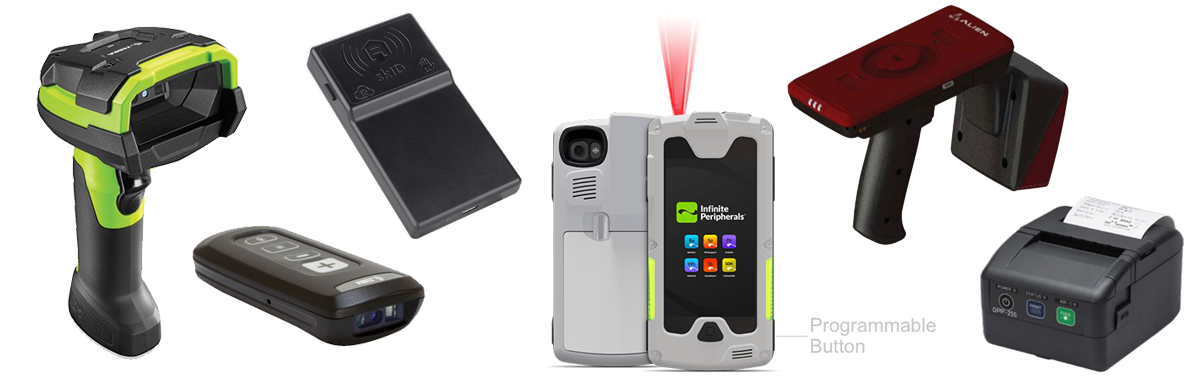
Gonector allows custom FileMaker apps for iPhone or iPad to seamlessly integrate directly with various mobile devices such as digital scales, RFID readers and mobile printers. Today we are happy to announce version 2.0 which doubles the number of supported devices.
The plug-in has been out for almost three years now and enabled some great apps to replace manual work with modern technologies, such as RFID and digital scales, without compromising the ease of use and develop
We're thrilled to announce the release of our fist add-on called elemental_dropzone. With this really easy to use add-on you're given the power of dragging multiple. files directly into your solution all at once. You can even drop entire folders into your solution.
Once dropzone is installed just drag it onto your lay out and specify a script for the dropped files to be sent to for processing - it's really that simple.
Best of all it is 100% free.
If you're new to FileMaker and don't know where to start, you're in luck! We've been working with FileMaker since 2003 on hundreds of projects, and we want to share our expertise with beginners like you. This collection of resources will help you get started building custom FileMaker Apps today. Read the full article here.
Reduce AWS Bill: Delete Snapshots with Python Lambda Script
When old snapshots pile up, so do costs – try these slick tricks to trim the bloat
By Leif Hanson, Full Stack Developer
So the billing department calls to inquire about eXtra eXpenses from AWS due to 14,000 32GB snapshots having piled up.
Unbeknownst to you, some backup script has gotten away from your team and started backing up repeatedly. Maybe you’re intentionally keeping around petabytes of backup data? Or maybe you need a pr
It seems like it's taken decades for many businesses and government agencies to move from pushing paper into the digital age of transactions. Recently, I was reminded of this by heading into town hall and having to push a bit of paper myself. Banks and other financial institutions still actually offer paper options surprisingly. I guess being in the world of tech comes with its own biases. But, despite the seemingly slow adoption, the migration is still happening and more and more things are goi
Have you ever opened an existing solution, took one look at the scripting - and your eyes just glazed over - as if you were attempting to deView the full article
Even if it's not a super interesting topic, and really only applies if you're managing a FileMaker server, it always pays to know how things work behind the scenes. If you've never used FileMaker's external authentication via LDAP then you'll want to watch this particular video.
If you're creating any type of FileMaker solution which needs to know when your users both enter and exit the system, which especially applies to using external authentication, then you'll enjoy the super simple access
FileMaker, Inc. and Claris have been waging a war against Manage Database clutter for over two decades. In the early days of FileMaker, let's say FileMaker 3.0, there was no need to worry about packing too much into Manage Database because people weren't designing complex solutions like they do today. These days, it's critical that you use all the tools at your disposal and don't just cram everything into Manage Database. This article will serve as a history of why features were added to FileMak
Recently, having had a conversation with a fellow developer about a FileMaker theme potentially causing issues with slow performance, it was asked about how it's possible to update a theme.
Whether you simply want to update existing styles and/or remove and add others, there's only a few critical things you need to remember about updating and migrating a theme. If you can get those few things right, then making any number of updates to your existing theme can be quite easy to accomplish.
The g
Editor’s note: today we have a guest article by long-time FileMaker developer, Peter Doern, who has come up with an elegant, outside-the-box methodology for managing imports. This is one of the coolest techniques I’ve seen in a long time. Enjoy. FileMaker includes a powerful and fast method for importing data from a source table to… Continue reading FRAP-Map: A Flexible, Robust, Accessible and Portable Data Mapping Technique View the full article
Sometimes you need to send a document to be signed virtually. Integrating PandaDoc with your FileMaker solution makes this an easy task. PandaDoc has a robust API that allows you to create, send, and receive documents digitally using the functionality of your FileMaker system to manage the process. This guide will show you how you can begin sending documents. Includes a video and sample file. Read the full article here.
.fusion-gallery-1 .fusion-gallery-image {border:0px solid #f6f6f6;}One of these things is not like the others … One of these things is in a class of its own The Excelsior. It’s a tank, a rugby club, a Federation starship, a brewing company … and now, a digital “get-out-of-jail” card for New Yorkers. Launched this week, the Excelsior Pass is a mobile app that allows gate-keepers to verify a customer’s COVID-19 vaccination status prior to entering a people-populated place. Flash the pass and you,