Welcome to our community, full of great ideas on developing your FileMaker solutions effectively,
for peer-to-peer support of the FileMaker Platform and related products and services.
Hacking Your Own FileMaker Platform Solutions
Should FileMaker Platform developers mount hacking attacks on their own solutions? At first glance, this may seem an odd question. But I believe that the answer is “Yes, we should.”
Consider this. As developers we see our solutions from a totally different perspective than Threat Agents see them. Without practicing our own hacking skills, we can become blind to the vulnerabilities a Threat Agent can exploit to compromise the Confidentiality
Forums are a great way to get technical advice for FileMaker but for some reason, many people don't think they have to be nice in the electronic world. I was raised to say "please" and "thank you" and that has translated over to the internet for me. But, other folks think the anonymity of cyberspace is an excuse to be a jerk. Some posters are outright offensive and others will just leave snide responses like, "that wasn't much help". News flash! People on the internet are real and you should be
Hierarchical JSON Viewer / Editor
By Andy Persons & Doug West
One of the standout new features of FileMaker Pro 16 is native support for the JSON data-interchange format. In addition to providing easy integration with a host of online services, it also provides developers with the tools to create robust hierarchical structures for use entirely within FileMaker. This hierarchical JSON viewer / editor file provides some tools for visualizing, manipulating, and leveraging JSON text.
Features
Part 2: What Should You Consider When Selecting a Development Partner? What Questions Might You Ask a Potential Developer?
Hiring a developer is about creating a working relationship. You want someone who gets your business and gets you. Having a good working relationship often determines the success or failure of a development project. Hire someone you are comfortable with who also has the skills necessary to make your project successful. Beyond the quality of the working relationsh
GoDraw3 is a FileMaker drawing tool for users. For FileMaker developers, however, it is full of customization. A developer can do with it what she wants.
The post GoDraw3: Hack the Heck Out of It appeared first on Geist Interactive.
View the full article
Note: Thank you to Colleen Hammersley for bringing this issue to my attention, and thank you also to Howard Schlossberg for proposing a clever and elegant work around that addresses the issue on the Windows platform. (We’ll also look at another fix that works cross-platform.) Today we’re going to explore a windowing behavior change that […]
View the full article
No Access? Watch the preview video here. ProtectingFileMakerFiles_Pre.mp4
Attachment
Size
Secure FileMaker.pdf
1.07 MB
By Matt Petrowsky
There's nothing more heart wrenching than when you first realize that something horribly wrong has just happened. It's such a distinct feeling that we all know what I'm talking about.
Just imagine being at the airport and you've got your laptop bag just beside you. After going through security, you feel like you're ready to have a relaxing
There's nothing more heart wrenching than when you first realize that something horribly wrong has just happened. It's such a distinct feeling that we all know what I'm talking about.
Just imagine being at the airport and you've got your laptop bag just beside you. After going through security, you feel like you're ready to have a relaxing flight. As you turn to grab your bag, you suddenly realize it's gone! Jumping up, you scan around and see absolutely no evidence of anything having happened.
Matt Petrowsky
When a programming environment doesn’t offer you every widget you might expect to have, then some enterprising individual will typically create the solution you seek - somewhere.
If that person shares the solution with everyone else, and you can find it, then it obviously makes your life easier. You just have to find the technique and take the time to implement and understand it. Anyone can simply copy and paste the pieces to a puzzle, but understanding how it works it w
When a programming environment doesn’t offer you every widget you might expect to have, then some enterprising individual will typically create the solution you seek - somewhere.
If that person shares the solution with everyone else, and you can find it, then it obviously makes your life easier. You just have to find the technique and take the time to implement and understand it. Anyone can simply copy and paste the pieces to a puzzle, but understanding how it works it what makes it possible to
No Access? Watch the preview video here. AccordionMenus_Pre.mp4
Attachment
Size
AccordionMenus.zip
344 KB
By Matt Petrowsky
When you’re designing in a small cramped space, and you’ve got a lot to put on the layout, you can always go for that native Popover button widget to store the extra info.
But when all that information needs to feel somehow connected to each other, just using a bunch of Popover buttons on the layout may not work well. In these cases, it’s best to go wit
When you’re designing in a small cramped space, and you’ve got a lot to put on the layout, you can always go for that native Popover button widget to store the extra info.
But when all that information needs to feel somehow connected to each other, just using a bunch of Popover buttons on the layout may not work well. In these cases, it’s best to go with an Accordion menu.
This familiar design pattern is very easy to accomplish within FileMaker and, when done right, can be a simple matter of c
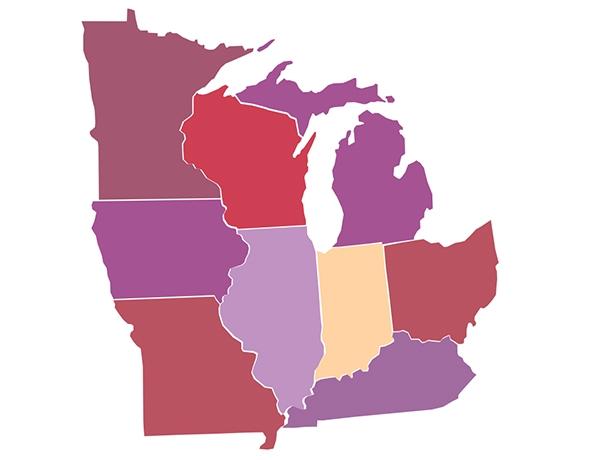
We made a heat map in FileMaker! Learn how to use vector-based SVG button icons for some very flexible custom charting. Includes a video, sample demo file and SVGs for all 50 states. https://www.dbservices.com/articles/heat-maps-in-filemaker/
dbservices.com
No Access? Watch the preview video here. FriendlyAlphabetFiltering_Pre.mp4
Attachment
Size
FriendlyAlphabetFiltering.zip
379.22 KB
By Matt Petrowsky
As a developer, it’s often hard to get out of a mindset where your response of “It’s simple silly, you just search for a portion of the word, not the whole word.” to the question of a particular search not providing a user’s expected results.
This type of response may come from a user when they mention they know the user “Petrow
As a developer, it’s often hard to get out of a mindset where your response of “It’s simple silly, you just search for a portion of the word, not the whole word.” to the question of a particular search not providing a user’s expected results.
This type of response may come from a user when they mention they know the user “Petrowsky” is in the database but it doesn’t come across verbally that they’re really searching for “Petrowski” - which obviously doesn’t match the version ending in a “y” ins
Welcome back for a second dip into the developer bag of tips and tricks. A few of today’s entries assume familiarity with part 1, so if you haven’t already checked it out, I invite you to do so before proceeding. We begin today with a couple ExecuteSQL tips. Tip #1: Get to know COALESCE The […]
View the full article
Attachment
Size
DefensiveLayoutNavigation.zip
295.9 KB
By Matt Petrowsky
Download Video
If it hasn’t happened to you yet, then it will at some point. Your FileMaker solution will simply grow and grow and you’ll be adding complex layers of security and access as you develop.
As you add that security, your users may report back that they can’t do what they’re supposed to do. Maybe they’re locked out of a given layout with a giant gray screen with the small words of “No Access”.
U
If it hasn’t happened to you yet, then it will at some point. Your FileMaker solution will simply grow and grow and you’ll be adding complex layers of security and access as you develop.
As you add that security, your users may report back that they can’t do what they’re supposed to do. Maybe they’re locked out of a given layout with a giant gray screen with the small words of “No Access”.
Ughhh! What does your user do now? Why should you even be dealing with this issue?
What you really need
No Access? Watch the preview video here. SimplifiedSearchQueries_Pre.mp4
Attachment
Size
SimplifiedSearchQueries.zip
380.57 KB
By Matt Petrowsky
As a software/database developer, one of your primary goals is making your solutions easy to use. This means users should be able to perform common queries by simply clicking buttons which run the queries automatically.
This is probably something you already do. But, the big question is this, “Do you make it easy on yourself for cre
As a software/database developer, one of your primary goals is making your solutions easy to use. This means users should be able to perform common queries by simply clicking buttons which run the queries automatically.
This is probably something you already do. But, the big question is this, “Do you make it easy on yourself for creating those simple queries?” Many developers will create a unique script for each of the various queries, and in some cases this is just fine. It’s when you start fe
No Access? Watch the preview video here. DeveloperTipsTricks_Pre.mp4
By Matt Petrowsky
As with all mastery of any trade, it’s a matter of familiarity with the tools, along with practiced skill, in which a craftsman can hone his or her proficiency. In development, it’s often a matter of knowing which tools are available, and how to use them, which may make the difference.
In this video, I showcase the tools I use, their most important features and how I personally use them. If becomin
As with all mastery of any trade, it’s a matter of familiarity with the tools, along with practiced skill, in which a craftsman can hone his or her proficiency. In development, it’s often a matter of knowing which tools are available, and how to use them, which may make the difference.
In this video, I showcase the tools I use, their most important features and how I personally use them. If becoming a more efficient and capable FileMaker developer is one of your goals then make sure to watch th
Our 2016 FileMaker training courses are scheduled!
Our trainers are Certified FileMaker Developers, who have been developing custom solutions at Skeleton Key for many years. Please visit each page for information, dates, and to register.
If you would like an individual invoice, please contact us. We offer a multi-person discount for companies that would like to send more than one trainee. Please contact us with interest in this discount. We offer on-site training for companies that qualify.
Have you heard of FileMaker's New Product Idea Space on the Community? Learn more about it and why we love it! Video included. https://www.dbservices.com/articles/filemaker-embraces-crowdsourcing/
dbservices.com
Over the last few years I’ve been collecting miscellaneous tips and tricks with the thought of eventually aggregating them into a blog posting, and it appears that day has finally come. Ideally there will be something new and useful here for developers of all levels, from the neophyte to the most grizzled of FileMaker veterans. […]
View the full article
No Access? Watch the preview video here. SendingEmailMerging_Pre.mp4
Attachment
Size
SendingEmailMergeFields.zip
388.62 KB
By Matt Petrowsky
What would a database solution be without the ability to send email? Well, it would be a database solution without the ability to send email - but who wants that right?
Email is obviously an integral part of our modern day communication. And, despite what the Twitters, Facebooks and Instagrams of the world would have you believe, email
What would a database solution be without the ability to send email? Well, it would be a database solution without the ability to send email - but who wants that right?
Email is obviously an integral part of our modern day communication. And, despite what the Twitters, Facebooks and Instagrams of the world would have you believe, email is here to stay.
The easiest way to add email support to a FileMaker database is to simply use the Send Mail script step. But, that’s boring, and sometimes it d
By Matt Petrowsky
As we’ve all likely heard before, a movie isn’t just great because of the cinematography, it’s the sound that counts just as much. What you hear, not just see, is what makes the difference between good and great.
So, if sound is so critical to a movie, then the analogy to a FileMaker layout is color. Sure, anyone can move and arrange fields and objects into some semblance of order. And, using FileMaker’s layout objects to furnish your layout for the best possible user