Welcome to our community, full of great ideas on developing your FileMaker solutions effectively,
for peer-to-peer support of the FileMaker Platform and related products and services.
Forums are a great way to get technical advice for FileMaker but for some reason, many people don't think they have to be nice in the electronic world. I was raised to say "please" and "thank you" and that has translated over to the internet for me. But, other folks think the anonymity of cyberspace is an excuse to be a jerk. Some posters are outright offensive and others will just leave snide responses like, "that wasn't much help". News flash! People on the internet are real and you should be
The FileMaker Let function is your tool to make a calculation readable, well formatted and easy to debug. Let us discuss how it can be used.
The post Like a Boss: Let us Discuss the FileMaker Let Function appeared first on Geist Interactive.
View the full article
FileMaker Kanban is the latest tool that offers familiar functionality for users and flexibility for the developer. It offers great functionality and organizes your data visually into lanes and cards.
The post FileMaker Kanban: Organize Your Data appeared first on Geist Interactive.
View the full article
The FileMaker Script Debugger is powerful. Its features are often overlooked. In this post we examine the buttons that control stepping through a script.
The post Like a Boss: Using the Script Debugger to its Full Potential appeared first on Geist Interactive.
View the full article
For the first time, DB Services has been ranked #3494 on the annual Inc. 5000 list, which ranks the country’s “fastest-growing innovators” based on overall revenue growth over a three-year period. The Inc. 5000 list has brought attention to America’s growing private businesses since 1982.
DB Services now joins the ranks of other Inc. 5000 list alumni such as Facebook, Zappos, Pandora, and others. DB Services is top ranked FileMaker Platinum Business Alliance Partner on the 2019 Inc. 5000 li
In this video we bring you the fundamentals of FileMaker Reporting. Some of FileMaker's features regarding arriving at that perfect report can seem somewhat hidden. The Sliding & Visibility settings are just one example.
It can also be a bit difficult in knowing how you can arrive at the perfect Summary report when you don't know which layout parts you do and don't need.
If you've struggled with creating that ideal output, whether truly printed or just for a digital PDF, then you'll likely
As you may know from experience, the weather has a tremendous impact on your ability to do business. With a weather API in FileMaker, you can quickly adjust your plans to keep your team safe and productive, no matter what.
How APIs work
An application programming interface (API) allows programs to talk to one another. In an increasingly digitized world, APIs are the glue that allows so many of our favorite applications to work together.
Most APIs use a text-based language like JSON to standar
Chris Moyer
The Moyer Group
FileMaker, Mobile & Web Specialists
Michigan & Georgia (Atlanta)
The post The Moyer Group – “The best hosting arrangement” appeared first on fmcloud.fm.
View the full article
JSONQuery @ FM-DiSC On Friday, January 14, Steve Senft-Herrera and I will be discussing and demoing JSONQuery at FM-DiSC (FileMaker Developers in Southern California). Useful Links Current version of JSONQuery: CF_JSONQuery_20211130_0120_PUBLIC.fmp12.zip Our recent two part in-depth interview series JSONQuery, part 1 JSONQuery, part 2 Coming soon: Steve Senft-Herrera’s demo file from the presentation Coming soon:… Continue reading JSONQuery at FM-DiSCView the full article
Within the realm of FileMaker development, there are a number of key techniques which allow you to do the types of things you'd normally expect in any development environment. Many of these have been around for many years. In this case, this one, a decade. The unfortunate thing is that some of these obscure methods and techniques just aren't that easy to replicate from memory. Some are hidden in the corners of FileMaker development because they feel like they're "hacks". But, at least they get t
When Add-ons were announced, it sounded like they were going to be the holy grail of transportable code within FileMaker. Thus far, I don't know exactly what the adoption rate is and if the effort is paying off for Claris. I think the concept still has legs; as you can see that the new experience Claris is putting into FileMaker currently leverages what was built.
While I have my own personal strong opinions about how Add-ons were implemented and are currently used, there's no doubt you can sav
Google offers a plethora of APIs to integrate different Maps features in custom solutions, including polygons. In this article, we will demonstrate how to display important geographic information in your FileMaker solution using the Google Maps JavaScript API polygons feature. Includes a video and sample file. Read the full article here.
When first starting with FileMaker, I remember learning all the default Date/Time/Timestamp functions. The documentation for FileMaker is great and the example calculations often lead you in the right direction.
One of the things I didn't know about was how dates, times and timestamps were treated internally. More importantly, how this impacted what I wanted to do with date/time calculations and integrating with external systems. Later down the road, I learned about all the other things I neede
Have you ever wished you could connect a portal to a JSON array? Portals and JSON arrays seem like they should be a natural fit, but FileMaker doesn’t offer us an obvious way to connect one to the other. (An example of where this might come in handy would be selection criteria for a report,… Continue reading Connecting Portals to JSON ArraysView the full article
Hi all,
The final technique in our best of 2021 series sees a nice way to silently commit idle users who have left a record in an uncommitted state. This is great for situations where a user locking a record has the potential to impact other users (or developers).
You can check out the article & example file technique here
Thank you for reading and supporting FileMaker Weetbicks in 2021 and we look forward to bringing you more content in 2022 - Merry Christmas!
Companies that use both FileMaker and Mailchimp often find themselves doing double data entry from one system to the next. In this article, we will demonstrate how you can eliminate the hassle of manually updating your email lists by integrating your FileMaker solution with Mailchimp. Includes a video and sample file. Read the full article here.
Hi all,
Number four in our best of 2021 series is a wee bit of code I have utilised many times throughout the year to run a script server-side using Perform Script on Server. This has proven a real time saver being able to write a script and then add one line of code to the top of it to force it to run on server - ideal for those times where you need to run a script quickly
You can check out the article along with an example file with the code here
Cheers!
Daniel
For many FileMaker systems, the number of concurrent logged in users, especially those who will hit issues with record locks, is often very low. Typically, these types of systems are used within the local area network and you just ask the offending user to unlock the record. However, with the number of remote users logging into a system through the WAN, a variety of things have had to change. The way you architect a database system can't necessarily take the same approach as was done before.
As
The post Claris Excellence Award Goes to fmcloud.fm! appeared first on fmcloud.fm.
AND THE 2021 CLARIS EXCELLENCE AWARD FOR INNOVATION GOES TO… FMCLOUD.FM!
It is a great honor and pleasure for us to announce that 1-more-thing has been awarded today with the most sought-after prize: the Claris Excellence Award for Innovation.
Indeed, the jury has recognized our revolutionary FileMaker hosting service, fmcloud.fm and the fact that it is light ye
Hi all,
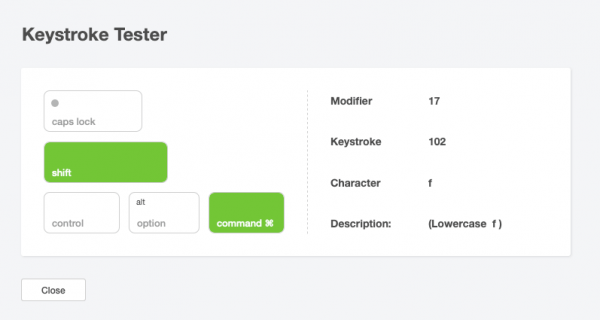
Part 3 in our Best of 2021 series is a little utility I built to help developers interrogate pressed keystrokes and modifier keys - very useful when writing scripts where modifiers or keystrokes are used.
You can check it out below. Stay tuned for the final 2 articles coming in the next few weeks.
Check out the article here
Regards,
Daniel
One of the most satisfying things about being a solution developer is the opportunity to create the user interface. You get to create, and modify, how users interact with your software creation. It's like shopping for just the right outfit for that perfect occasion. The one which will present your software in just the right light and with the right amount of pizazz.
Of course, you have to be willing to update and change your style over time. Nothing stays popular forever - right? So, you consta
Data moves our world. Tools like barcodes make it possible to transmit this essential data much more quickly. Thanks to the latest versions of Claris FileMaker, it’s possible for your organization to not only process barcodes, but to also:
Generate barcodes.
Store and retrieve information.
Scan barcodes in the field with the FileMaker Go app.
Let’s dig into how barcodes can improve your organization and how FileMaker’s built-in barcode add-on makes everything simpler.